
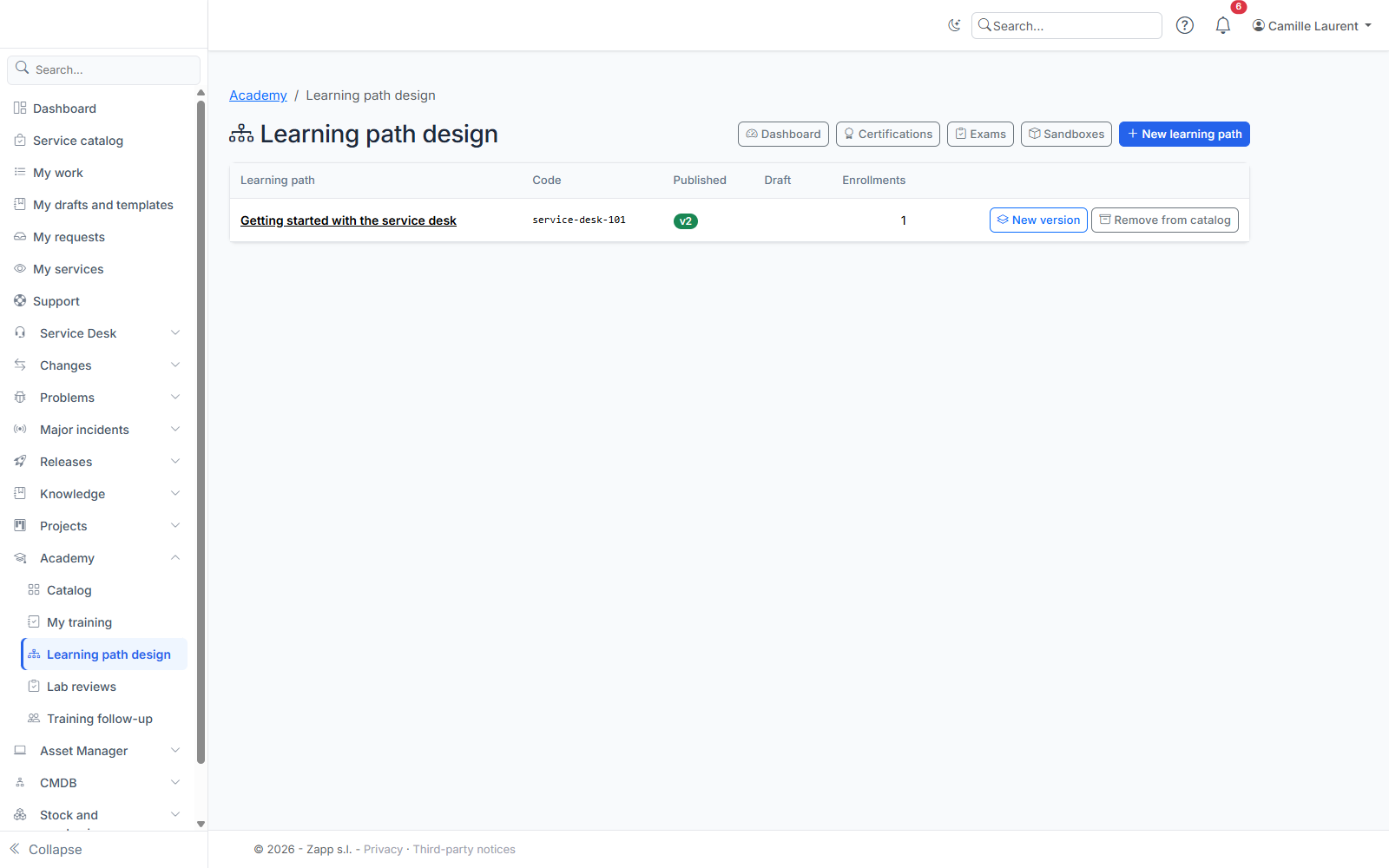
Academy learning paths are designed in Academy > Learning path design (/academy/admin), reserved for administrators and the Academy administrators group.
Creating a path
New learning path (/academy/admin/new) asks for:
- a code: lowercase letters, digits and hyphens (for example
service-desk-v4). It appears in the path address and never changes; - a name in at least one of the active languages.
The path is created with a first version as a draft, invisible to learners.
Version settings
A version page (/academy/admin/versions/{id}) gathers its settings and its steps. Only a draft can be edited.
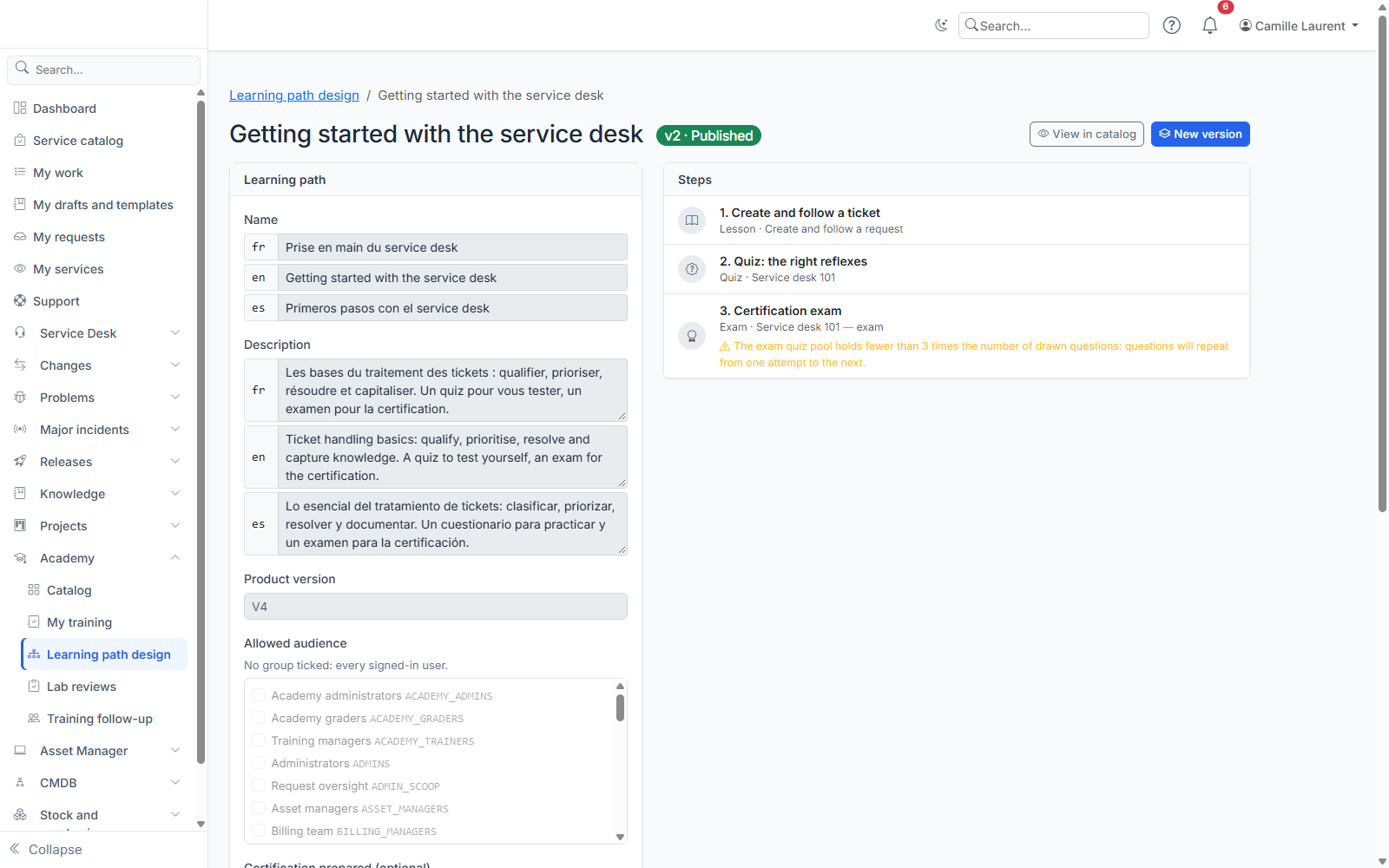
- Name and description: one entry per active language; a language left empty shows the instance language.
- Product version: the targeted major version, as free text (for example
V4). - Allowed audience: the groups that see the path in their catalog. No group ticked: every signed-in user.
- Certification prepared: the title of the certification the path prepares, optional. It is awarded by passing the path exam. Set its validity in months (24 by default) or tick Does not expire for an attestation, the group granted to certified learners while the certification is valid, and, for an update path, the path whose certification it extends.
- Certification required to enroll: another path whose valid certification is a prerequisite.
- Strict step order: on by default, a required step not yet passed locks the following ones.
- Remind after (days without activity): an enrolled learner who stops making progress gets a reminder, once per period without activity. Empty: the instance setting (14 days); 0: no reminder.
Steps
Add a step offers four kinds:
- Lesson: a knowledge base article, read in the Academy without being copied. Search a published article by its title, or enter the shipped documentation key (for example
tima/tickets/creer-un-ticket): the key stays valid when the documentation is imported again. A path can cite a restricted article (a category read by some groups only, or an internal knowledge base): its enrolled learners still read it, screenshots included, from the Academy. Only the article of the step is opened to them: the same article opened from the knowledge base, and the other articles it links to, keep their usual rights. An unpublished article is never shown, and learners lose this access if the path is withdrawn from the catalog or if they leave its audience. You can only cite an article that exists and that you can read yourself, optional steps included: the search only offers those, and a missing article or one you cannot read is refused when the step is saved and when the version is published. If the documentation key exists in several knowledge bases, it is refused as ambiguous: pick the article from the list, it is then cited by its identifier (a key entered as well is ignored). On publication, the verified article is frozen: learners read that one, and if it disappears, the lesson is unavailable until a new version is published. A path promoted by a GOLIVE is published regardless of the operator's reading rights; its articles only have to exist without ambiguity. - Quiz: a form of the "quiz" kind. Without a quiz module available, the step stays unavailable to learners.
- Hands-on lab: a mission (a knowledge base article, chosen as for a lesson) and checks. Choose the checked instance: the learner's instance (they declare its address and a lab API key), their personal sandbox, or none if the step only has human reviews.
- Exam: the exam quiz (a "quiz" form, taken in exam mode: never the correct answers), then, if you add some on the step page, exam labs (checks as for hands-on labs, with an optional mission) to pass within a deadline in days (7 by default). One exam per version. The page warns you when the exam quiz question pool holds fewer than three times the number of drawn questions: questions would repeat from one attempt to the next.
A step can be optional. The arrows change the order of the steps, the pencil opens the step (/academy/admin/steps/{id}) and the bin deletes it. The list flags an article or quiz that is not found or not published.
Lab checks
Once the step is saved, open it (pencil): the Lab checks section lists its checks and Add a check creates one. The step is passed when all of them pass. Three kinds:
- API call: a route of the instance's API v1, called read-only (
/api/v1/…), and a condition on the response — the HTTP status, item exists, a field value (equals, differs from, at least, at most…) or the number of items of a list. The path points to what is checked:items,items[0].name, oritems[code=SUPPORT_N2].members(the first item whose field has that value). Example: "a groupSUPPORT_N2exists and has at least 2 members". No code is ever sent to the instance. - Provided check: offered by a module or by your product (for example "the instance has activated its lab license"), with its parameters if any (
name=value, one per line). - Human review: the learner submits a deliverable following your instructions; a reviewer approves or rejects it.
For each check, write a label and, for automatic checks, a hint shown when it fails: it guides the learner without giving the answer.
Reviewing deliverables
Reviewers (Academy graders group) find deliverables in Academy > Lab reviews (/academy/review): path, step, learner, instructions and the learner's note, file to download. Approve or Reject (a rejection needs a comment, which the learner reads). Nobody reviews their own deliverable.
Publishing
Publish puts the version in the catalog. Publishing is refused while the version has no name, no required step, or an incomplete step (lesson without an article, quiz without a form, lab without a mission or checks, or with automatic checks but no checked instance); the message lists what to fix.
If a version was already published, it is archived: it no longer accepts enrollments, but learners following it carry on. They are invited to switch to the new version, keeping the passed steps that did not change.
Evolving a path
A published or archived version can no longer be edited. New version creates a draft copied from the latest version; copied steps keep their identity, so a learner who switches keeps what they passed.
Remove from catalog archives the published version: the path leaves the catalog, current enrollments carry on.
A path designed on a test instance reaches production through GOLIVE (type "Learning path"): its published version becomes a new published version there, with its quizzes and articles. Enrollments and progress never travel, and a path that production removed from its catalog is not republished there.
Certifications and exams
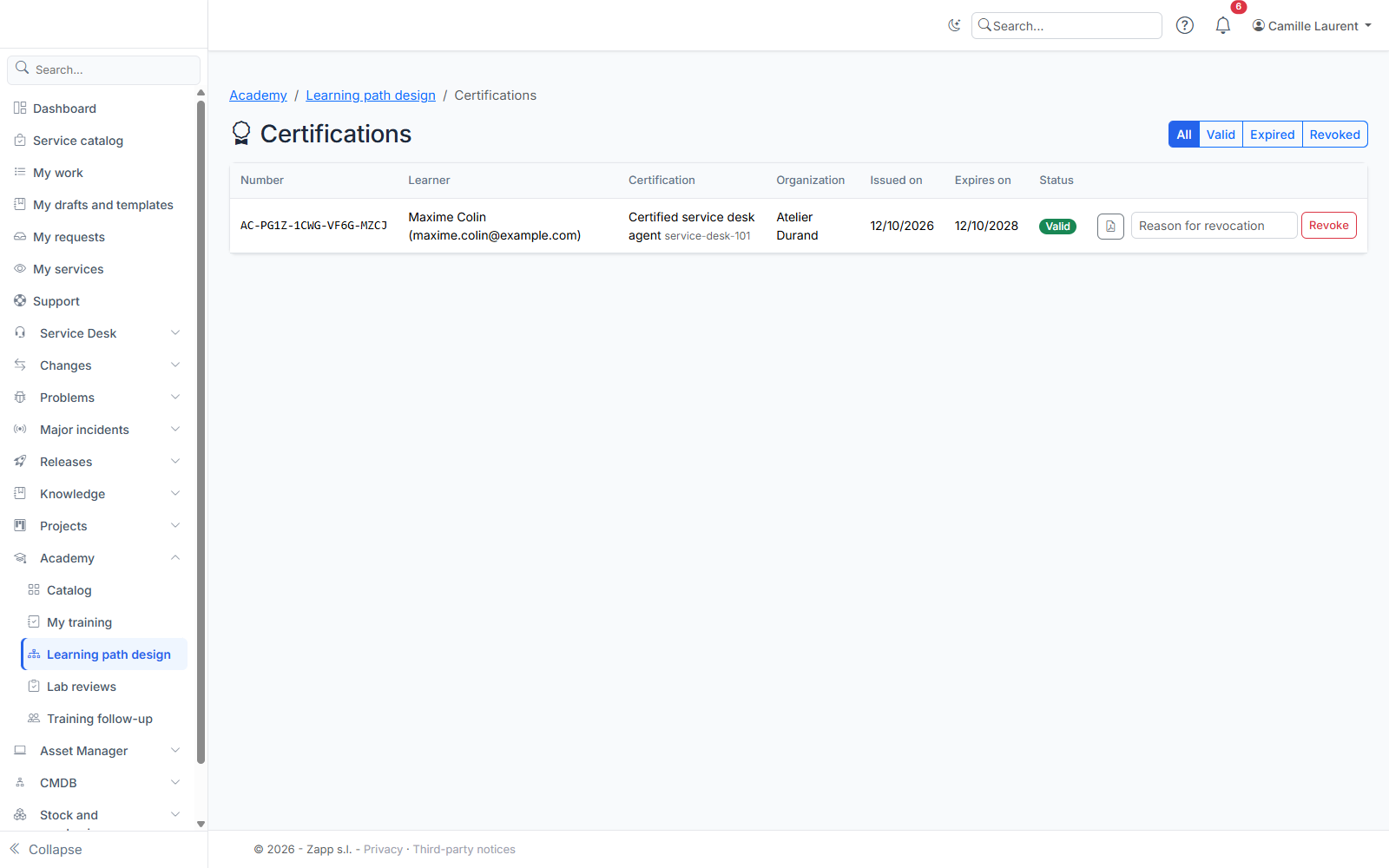
The Certifications button of the path list (/academy/admin/certifications) shows the certifications issued: number, learner, organization on the issue date, dates and status, with a status filter. Each one's PDF can be downloaded here. Revoke asks for a reason and is final: the certification becomes revoked and the granted group is removed. The Exams button (/academy/admin/exams) lists every exam attempt: learner, date, duration, quiz score, language and outcome. Exams are not proctored: their value comes from the hands-on labs and the question draw.
Dashboard
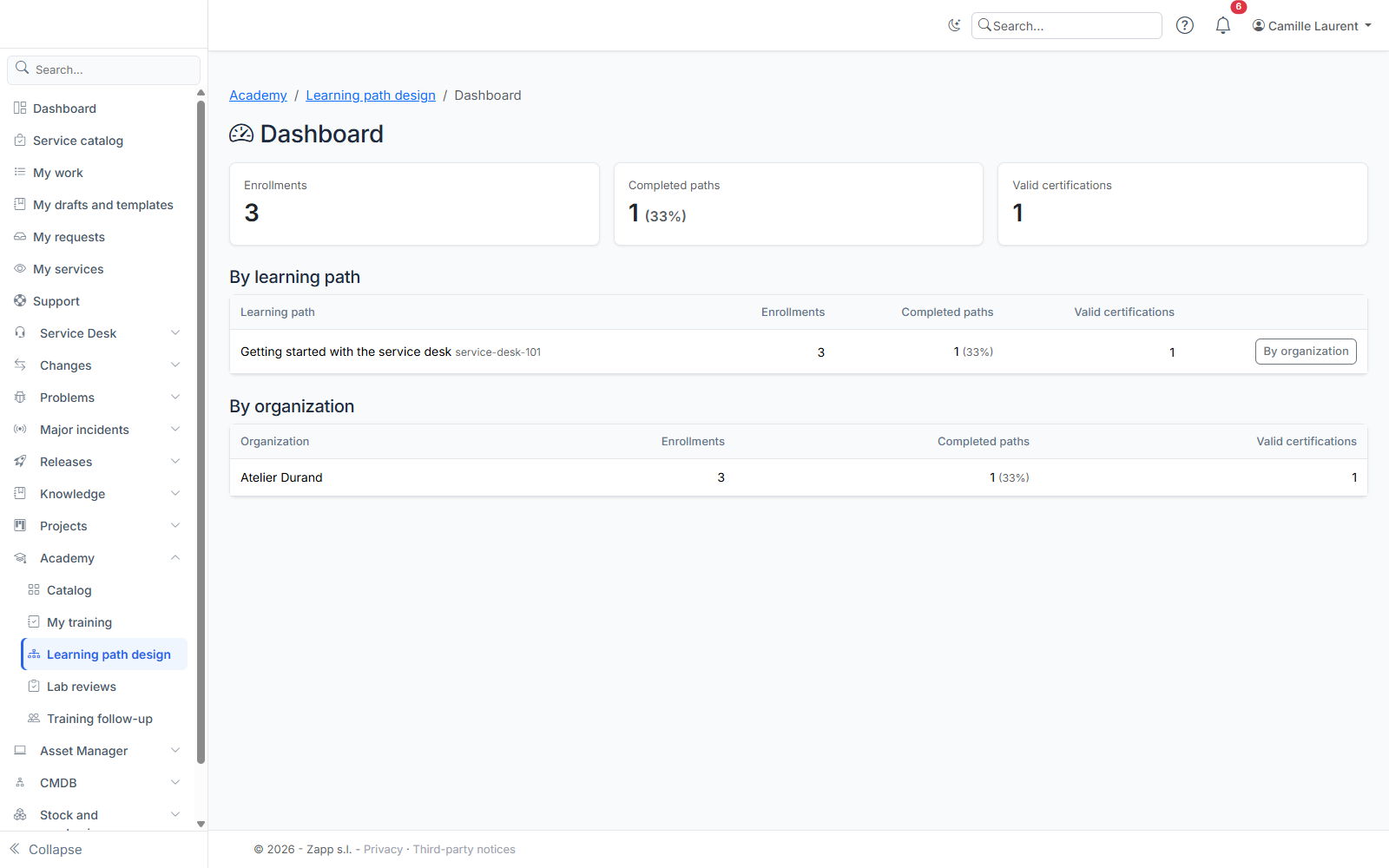
The Dashboard button of the learning path list (/academy/admin/dashboard) gives the totals — enrollments, completed paths (and their rate), valid certifications — then the breakdown by learning path and by organization. By organization on a path's row restricts the second table to that path. The organization is the learner's on the day of enrollment (or of issue, for a certification); learners without an organization are grouped under No organization.
Learner sandboxes
The Sandboxes button of the path list (/academy/admin/sandboxes) shows each learner's sandbox: path, status (and the provider's error message), last visit, planned deletion date and reason. Delete deletes a sandbox immediately, without notice: the learner loses everything they did in it. Show deleted adds the history.
Sandboxes are created by a provider installed with your product. Without a provider, the page says so and sandbox labs are unavailable.