
The Administration › Connectors and automation › Microsoft Teams screen sets up the two MyZapp bots in Teams: Notifications and Assistant, one tab each. It is for administrators. The preparation in Azure is described in "Set up Azure for the Microsoft Teams bots".
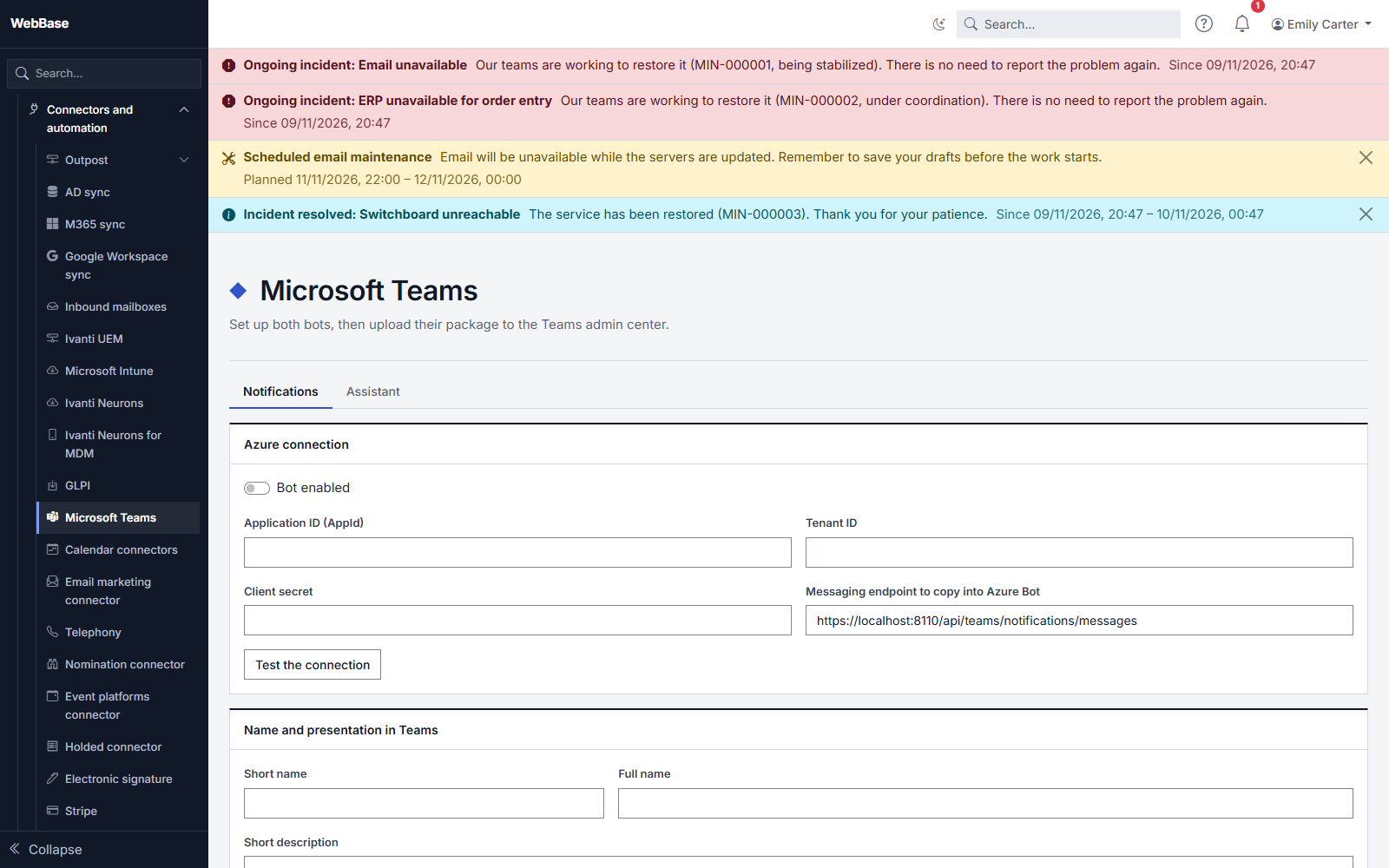
Azure connection
- Bot enabled: a disabled bot does not answer and sends nothing.
- Application ID and Tenant ID: those of the bot's Entra registration.
- Client secret: paste its value. Once saved, it is never shown again; leave the field empty to keep it.
- Messaging endpoint: the address to copy into the Azure Bot resource.
- Test the connection: checks the values entered without saving anything, and tells you what is wrong (expired or wrong secret, application or tenant not found).
Name and presentation in Teams
The short name (30 characters at most) is the name your users see in Teams. Add a full name, a short description (80 characters) and a long description, an accent color and, if you wish, your icons:
- color icon: 192 × 192 pixel PNG;
- outline icon: transparent 32 × 32 pixel PNG, in white.
Without uploaded icons, the MyZapp ones are used.
The Teams package
Download the Teams package produces the file to upload to the Teams admin center. Its version goes up with each change of name, description or icon: the screen then shows "The package has changed" until you download the new package. Then upload it again to the Teams admin center.
Installation for users
Choose the group whose members will receive the app, then save. Install now handles members in batches of 50; a nightly job then installs the app for new members. This requires the Microsoft Graph permissions described in the Azure setup page.
The installation link also lets anyone install the app themselves.
What the Notifications bot does
The Notifications bot sends, as a private message, the notifications each person chose to receive in Teams: subject, text and an Open in MyZapp button to the page concerned. It does not read messages: nobody can write to it. If someone mentions it in a channel or writes to it anyway, it replies once a day per conversation, pointing to the Assistant bot, or to MyZapp if the Assistant is not enabled. The text received is not kept.
Linked accounts
At the first exchange with a bot, the person's Microsoft 365 account is matched with their MyZapp account, by address. The list shows these links; Unlink removes them, and the link is made again at the next exchange.
When a bot is unavailable
- The Assistant bot needs the AI module: without it, the screen says so and refuses to enable it.
- On an instance under the HDS security profile, the Assistant is always off, and the Notifications bot is off too, unless the operator of the instance decides otherwise.