
In the internal interface, the assistant helps Service Desk agents find, summarize and handle tickets, in conversation. It opens with the round button at the bottom right of the screen, as for requesters. The "Using the assistant" guide covers writing, dictation and the summary; this page covers what is specific to agents and operators.
Find and understand tickets
Ask in your own words:
- "my critical overdue tickets", "incidents from organization X this week", "unassigned tickets of the Network group";
- "summarize ticket 1234": the assistant summarizes the description and the thread, replies and notes included;
- "where do the deadlines of 1234 stand?": it gives the state of its deadlines (SLA), missed or upcoming;
- "are there similar tickets already resolved?": it looks for close resolved tickets and their solution.
On a ticket page, "summarize it" is enough: the assistant knows which ticket you mean.
It only reads the tickets you can see on screen yourself, with the same visibility rules. Internal notes are only given to it if you are an agent.
Act on a ticket
You can also ask it to act:
- create a ticket ("create a ticket: the 2nd floor printer no longer prints");
- add a reply to the requester or an internal note;
- change the status, priority or assignment;
- link a ticket to a parent ticket.
Nothing is done before you click Send. The summary shows the number of the ticket concerned and the full text of a reply or note: read it, it will be sent as is. Modify, or a written correction, discards the summary.
Each action goes through the same checks as on screen: an action reserved for agents is also reserved for the assistant, and a required field it cannot fill in conversation sends you to the form.
View the conversation behind a request or a ticket

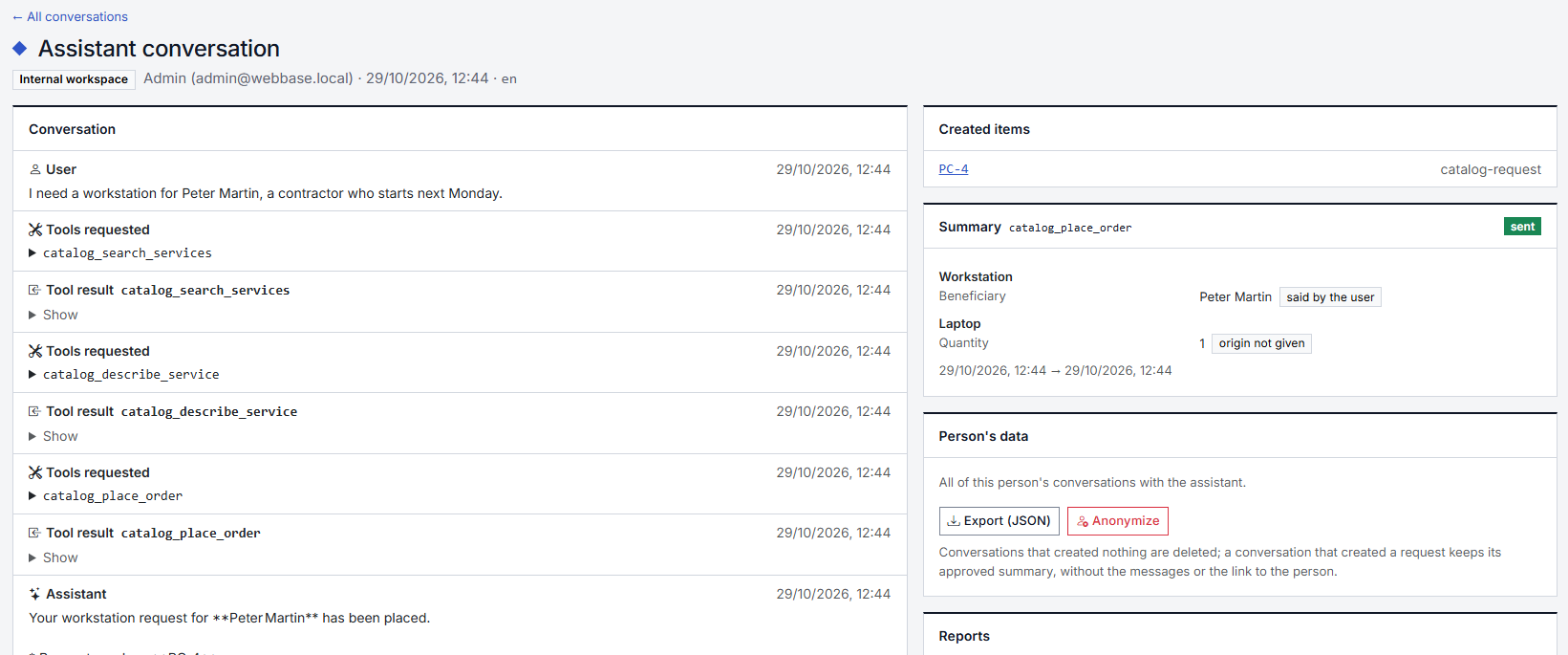
A service request or a ticket created by the assistant shows the Created with the assistant panel, with the View the conversation link. It opens the conversation that created it:
- the messages, marked "dictated" for a dictated message;
- each summary and what became of it (sent, modified, declined);
- the sent summary, the reference for what was requested, with the origin of each value: said by the requester, inferred ("tomorrow" turned into a date) or reused from another request in the conversation;
- the items created.
Use it to clear up a doubt about a value: if the requester said "Monday" and the date is wrong, the conversation shows it.
The panel only appears if you have the View assistant conversations permission, and only on items you can already see. Each view is recorded (who, when, from which item). If the assistant made a mistake, Report a mistake on the conversation sends it to the administrator.
The panel disappears when the conversation reaches the end of its retention period; the request or ticket itself stays.