
The assistant places catalog requests, answers from the knowledge base and helps agents with tickets, in conversation. This page explains how to turn it on, set it up, review its conversations and handle personal data requests.
What it needs
- A configured AI (AI configuration screen, see "Configure AI"): a chat provider that can call tools. With the "None" provider, the assistant is offered to no one.
- The Assistant module license.
- Tools: those of the installed modules (service catalog, knowledge base, Service Desk). With no tool for an audience, the assistant is still offered to it but can only reply: it cannot search, create or look anything up.
For dictation, also choose a provider in the Transcription section of the AI configuration. Without transcription, there is no microphone, unless you allow the browser's speech recognition (setting Assistant:Voice:BrowserFallback, below).
Turn it on per audience
The settings are in Configuration, Assistant category:
| Setting | Audience | Default |
|---|---|---|
Assistant:Enabled:Connected |
requesters signed in to the portal | on |
Assistant:Enabled:Internal |
internal interface: administrators, agents, sales | on |
Assistant:Enabled:Guest |
visitors without an account, on public pages | off |
Each audience only sees the tools of its rights: a guest only sees public services and public knowledge bases, a requester the services of their catalog, an agent the tickets they see on screen.
Limits and budget
Assistant:DailyQuotaPerUser: messages per signed-in user per day (100; 0 = no limit). It replaces the knowledge base chatbot quota.Assistant:Guest:DailyTokenBudget: AI budget for all visitors without an account, in tokens per day (200,000; 0 = no limit). Once reached, the assistant is no longer offered to guests until the next day; the regular form stays available.- Each guest conversation goes through a bot check when it opens (if one is set up for guest forms) and stops at 20 messages.
- The monthly AI caps (AI usage screen) also apply to the assistant, which appears there under its own features.
Dictation
Assistant:Voice:Enabled:Connected,Assistant:Voice:Enabled:Internal: microphone offered to these audiences (on when the setting is missing).Assistant:Voice:Enabled:Guest: microphone for visitors without an account, off by default. When on, each dictation is limited per address and per session and counts in the guest budget.Assistant:Voice:MaxSeconds: maximum length of a dictation (60 seconds, from 5 to 300).Assistant:Voice:BrowserFallback: allows the browser's speech recognition when server transcription is missing or fails. Off by default: the sound does not stay with you, the browser sends it to its vendor (Google for Chrome, Microsoft for Edge), a service your organization did not choose. When on, the user is told each time. Off and without transcription, the microphone is not offered; the keyboard remains.
If the assistant receives sensitive data, keep this fallback off and transcribe with a provider covered by your organization's contract, or hosted by you: a Whisper server compatible with the OpenAI API (for example faster-whisper or Speaches) is declared as an OpenAI provider with your server's address; the sound then never leaves your network.
The audio is never kept; only the text the user sends is, marked "dictated". The transcribed duration is counted in seconds in AI usage.
Permissions
- Use the assistant: any signed-in user (Assistant actions).
- View assistant conversations:
ADMINS,ADMIN_SCOOPandTIMA_ADMINSgroups by default. Grant it to operators who need to read the conversation behind a request or a ticket: they then only see the conversations of items they can already see. - The list of all conversations, resolving reports, export and anonymization stay with
ADMINS.
Review the conversations
The Assistant conversations screen (/assistant/exchanges) lists all conversations. Filter by period, Audience, Tool used, Item created or on Reported conversations, then open one: messages, tools called and their results, summaries and their outcome, origin of each value, items created.
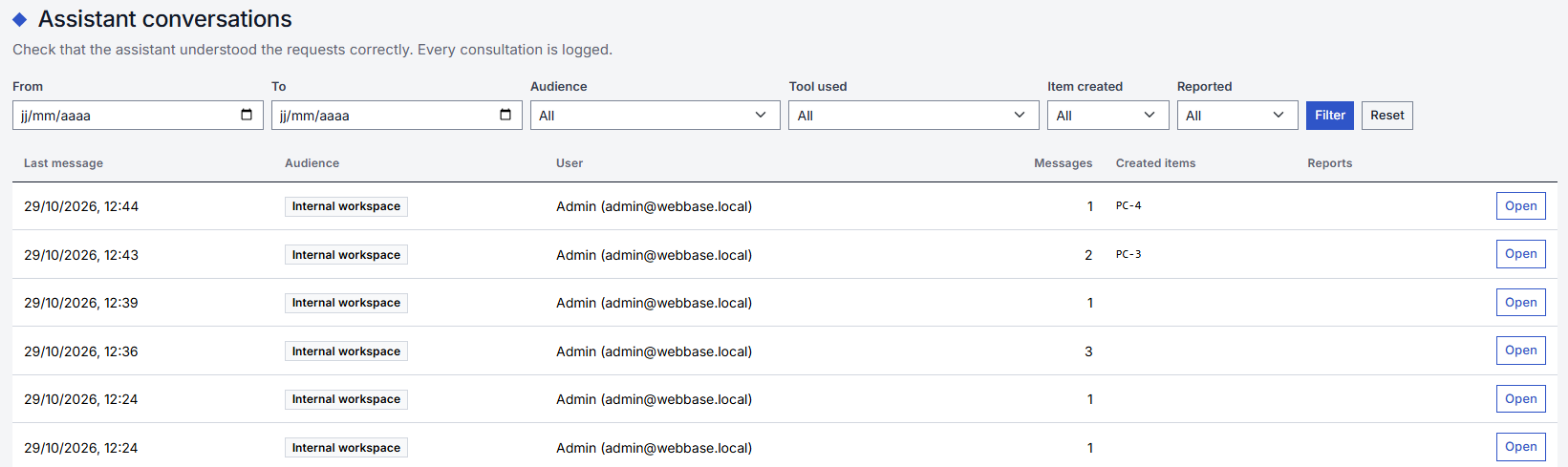
Each view is recorded. A mistake report (from the user or an operator) appears on the conversation; once handled, Mark as reviewed.
Reported mistakes often point to a poorly described service: a chance to rework its description or its form labels.
Conversation retention
A conversation with no message for its audience's period is deleted each night, with its summaries and reports:
Assistant:Retention:GuestDays: visitors without an account, 30 days;Assistant:Retention:ConnectedDays: signed-in requesters, 365 days;Assistant:Retention:InternalDays: internal interface, 365 days.
The request or ticket created is never touched; only the "Created with the assistant" panel disappears.
Export and right to be forgotten
On a conversation's screen, the Person's data section acts on all conversations of that conversation's person (their account, or for a guest their email address):
- Export (JSON): a copy of their conversations, without the tools' internal results;
- Anonymize: a conversation that created nothing is deleted; a conversation that created a request keeps the confirmed summary, without the messages or the link to the person ("anonymized" mention).
Erasing a user account does the same for their conversations.
Write services that work well with the assistant
The assistant finds a service from its name (in each language), its code and its description, then fills its form from the field labels. A few rules:
- a name that states the need ("Workstation for a new starter") rather than an internal code;
- a description of two or three sentences using the words requesters use: for whom, for what, what is provided;
- a name and description translated into each language of the instance;
- explicit field labels ("Arrival date", not "Date 1"), and help text on ambiguous fields;
- choice lists with meaningful values;
- a field that cannot be filled in conversation (attachment, signature) stays to be filled in the form: the assistant tells the user.
Then try a request in conversation as a requester would: if the assistant hesitates between two services, bring their descriptions closer or set them apart.